ActionNew
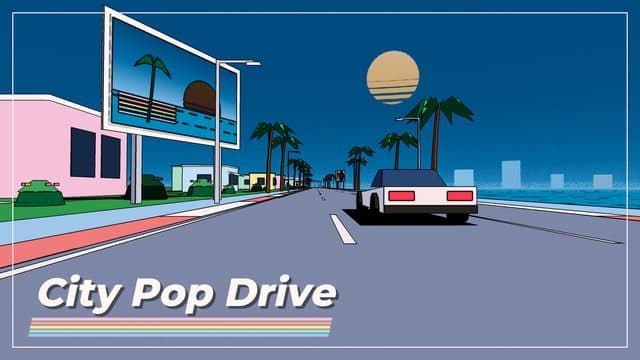
City Pop Drive
Navigate pastel 80s cityscapes in this arcade driving game.
Hosted by playgama.com
Embedded from playgama.com in a sandboxed frame.
About City Pop Drive
City Pop Drive is a one-thumb arcade drive through pastel 80s city pop scenery. Pass traffic close to fill the Breeze meter and boost, reach each checkpoint before the timer runs out, and choose the scenic or the express road at every fork. Five maps (Seaside, Midnight Expressway, Crossing City, Maple Pass, Snow Resort), each with its own twist and adaptive music that changes with your route, and 25 record-sleeve covers to collect. Play free in your browser, no download needed, on desktop, phone or tablet.
How to play City Pop Drive
- Press the Play button above. The game loads in seconds, with nothing to install.
- Tap to start, then drag left or right to steer (mouse drag, arrow keys or A and D on desktop; P pauses). · The car accelerates by itself. · Pass close to traffic for near misses: they add time and fill the Breeze meter, and a full meter starts a Boost that knocks cars aside.
- On a phone or tablet, tap Play to open the game full screen.
- Your best scores and progress are saved on this device, so you can come back any time.
City Pop Drive FAQ
- Is City Pop Drive free to play?
- Yes. City Pop Drive is completely free on Drift Cart Games, with no sign-up and no purchase.
- Can I play City Pop Drive on mobile?
- Yes. It runs in the browser on phones and tablets as well as desktop. Tap Play and it opens full screen.
- What are the controls for City Pop Drive?
- Tap to start, then drag left or right to steer (mouse drag, arrow keys or A and D on desktop; P pauses). · The car accelerates by itself. · Pass close to traffic for near misses: they add time and fill the Breeze meter, and a full meter starts a Boost that knocks cars aside.
- What kind of game is City Pop Drive?
- City Pop Drive is a action game tagged action, driving, arcade, racing, 3d. Navigate pastel 80s cityscapes in this arcade driving game.